 Ideas for a smarter digital life.
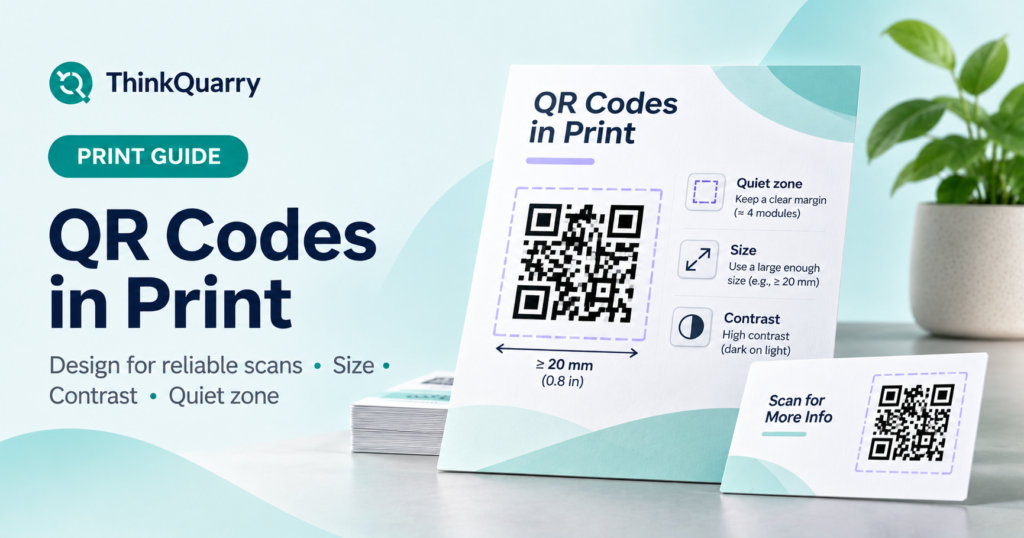
QR codes in print should be large enough to scan at the expected distance, high contrast, and surrounded by clear space. Export a crisp image or print-ready design, then test it on the actual paper, packaging or sign before ordering a full batch.
A QR code that looks attractive on a laptop can fail on a folded menu or a glossy label. The goal is not merely to add a square pattern: it is to help a real person reach the right page with one scan.
This guide explains practical QR sizing, the difference between PNG and vector files, how to create a custom QR code in Canva, and what a free QR code generator that doesn’t expire can—and cannot—promise.
What makes a printed QR code easy to scan?
There are four factors to check before printing:
- Size: The individual dark-and-light modules must be large enough for the scanning device and distance.
- Contrast: Dark modules on a light, plain background are the safest starting point.
- Quiet zone: The code needs an uninterrupted blank margin around all four sides.
- Destination: The linked page must load on a phone and remain available to the intended audience.
The physical print also matters. Smudged ink, glare, a curved surface or a fold through the pattern can interfere with a scan even when the original digital file is valid.
What size should a QR code be for print?
For small, close-range materials such as business cards, use about 2 × 2 cm (0.79 × 0.79 in) or larger as an initial design guideline. Canva includes this 2 cm minimum in its QR design recommendations. This is not a universal guarantee: a more complex QR code, a low-quality printer, or a longer viewing distance may require a larger symbol.
A rough planning table is helpful, but real testing determines whether a size works:
| Placement | Starting approach | Important check |
| Business card or receipt | Start around 2 cm or larger | Can phones scan at comfortable close range? |
| Table menu or small flyer | Give the QR generous space | Does the code survive paper texture and glare? |
| Poster or window sign | Increase size for the viewing distance | Can users scan without standing awkwardly close? |
| Packaging | Avoid creases, seams and tight curves | Does the final printed package still scan? |
DENSO WAVE, the company behind QR Code technology, notes that larger modules generally improve readability and that practical dimensions depend on the printing process and scanner. See its module-size guidance.
Always leave a quiet zone
The quiet zone is empty space around the edge of a QR code. According to DENSO WAVE, a standard QR Code requires a margin four modules wide on every side. A module is one of the smallest individual squares in the pattern.
Do not put text, icons, photo textures or a decorative border inside that space. If your generator already includes the margin, preserve it when cropping or placing the image in a layout.
Practical check: Place the QR on a plain white panel instead of directly over a busy photograph. This makes the code easier for a camera to distinguish from its surroundings.
How to create a QR code in Canva for printing
If you are searching for how to create a QR code in Canva, these steps work well for a flyer, business card or menu design:
- Open a Canva design at the final intended print dimensions.
- In Elements or Apps, search for QR code.
- Choose a static code for a fixed URL, or evaluate a dynamic code if later URL changes are essential.
- Paste the final destination URL and generate the code.
- Place the code on a light, uncluttered area of the design. Do not stretch it into a rectangle.
- Add a useful caption such as “Scan to view the full menu” or “Scan to register.”
- Export the design in a suitable print format and scan a real print proof.
Canva’s QR features may vary by account tier. In particular, advanced styling, logos, scan insights and managed dynamic functions can require specific plans. Refer to Canva’s current Help Center article rather than assuming every feature is free.
Should you choose a QR code PNG, SVG or PDF?
A QR code PNG is a normal raster image with a fixed number of pixels. It is straightforward to insert into many documents and graphics. It works well when exported at adequate resolution for the final print size.
SVG stores the QR pattern as scalable shapes and stays sharp when resized. It is useful for professional layouts, provided your generator and printing workflow support it.
PDF is often the final delivery file for a poster or card, especially when the code is already placed in a print design. A PDF is not automatically high quality: if it contains a blurry QR image, the result can still be blurry.
| File format | Best use | Watch out for |
| PNG | Digital graphics, small printed inserts, common office tools | Low-resolution exports become fuzzy when enlarged |
| SVG | Scalable professional artwork | Not every generator or editor offers SVG |
| Print-ready PDF | Delivering a complete poster, label or card layout | Verify the embedded QR is sharp and has correct margins |
As a starting point for raster artwork, export enough pixels for your final physical size. At 300 pixels per inch, a 2 cm code is about 236 pixels wide; a larger print requires more pixels. Pixel count alone does not ensure scannability, so always test.
How to make a custom QR code without hurting readability
A custom QR code can fit your brand, but style should never prevent scanning.
- Keep strong foreground/background contrast.
- Avoid gradients that make parts of the code almost invisible.
- Preserve its square shape and corner locator patterns.
- Keep any logo relatively small and in the area intended by the generator’s customization tool.
- Do not cover the quiet zone with other design elements.
- Test the downloaded design at the actual size, not merely the builder’s preview.
A QR code’s error correction can tolerate some damage in suitable conditions, but it should not be treated as permission to obscure arbitrary parts of the pattern. Decorative designs should receive extra scan tests across phone models.
Does a QR code expire? What “free forever” really means
A common search is “free qr code generator that doesn’t expire.” The most reliable answer begins with the difference between a static QR and a dynamic redirect service.
A static QR code has fixed data inside it. There is no built-in countdown that makes its pattern expire. If it contains a URL, though, the linked page can move, be deleted or become restricted. A free short-link provider can also stop supporting the redirect.
A dynamic QR code typically points to a service-managed redirect. That may allow link updates or analytics, but it introduces a dependency on that service’s account rules, billing plan and uptime. Some providers offer expiry settings; others limit features after a trial.
For a printed QR meant to last, consider putting it on a stable URL under a domain you control. You can maintain that page or, if appropriate, manage a redirect at that URL. Be sure any redirect continues working: the physical code will not repair a broken link.
For more on generating the underlying code, see our pillar guide to making a QR code for free. (Enable after the pillar is published.)
The pre-print QR code checklist
Before approving 500 invitations or 5,000 packaging labels, run a small print proof and verify:
- The QR is clearly visible and has a blank margin on every side.
- It has not been compressed into a narrow or stretched shape.
- It scans from a comfortable distance under normal lighting.
- Both the QR image and the printed call-to-action point to the right destination.
- The landing page works on a phone and does not ask for unexpected permissions.
- A readable URL is available as a backup when practical.
- The printed material remains useful if the linked page needs updating later.
If your QR leads to a survey, follow our Google Form QR code guide to check the responder link and access settings before printing. (Enable when that cluster is published.)
Frequently asked questions
What is the minimum size for a printed QR code?
Around 2 × 2 cm is a useful starting recommendation for close-up print, but there is no single size that guarantees every scan. Distance, content density, material, printer and camera all matter.
Can I print a QR code as a PNG?
Yes. Download a sufficiently high-resolution PNG, keep the pattern square and test it at the final physical dimensions. SVG can be easier for large, scalable designs.
Do static QR codes expire?
No built-in expiry applies to a standard static QR code. The linked website, document or redirect can still become unavailable or change permissions.
Can I add my logo to a QR code?
Often yes, using a generator that supports logos. Keep the mark small, preserve contrast and margins, and confirm the resulting code scans reliably before printing.
Should I use a dynamic QR code on a printed menu?
A managed dynamic code is useful if you need to replace the target URL frequently. If you can keep one stable URL on a domain you control and update the webpage content instead, a static QR may be simpler.
The bottom line
For reliable QR codes in print, prioritize scanability over decoration: choose a generous size, keep a four-module quiet zone, export sharp artwork, and test on the real surface. If the code is intended to last, control the destination and understand the obligations of any redirect provider before you print.
Sources and further reading
- DENSO WAVE: Securing the QR Code quiet zone
- DENSO WAVE: Determining module size
- Canva Help: QR code setup and design practices
Start with the main QR code tutorial, explore QR codes for Google Forms, and see Wi-Fi QR sharing.