 Ideas for a smarter digital life.
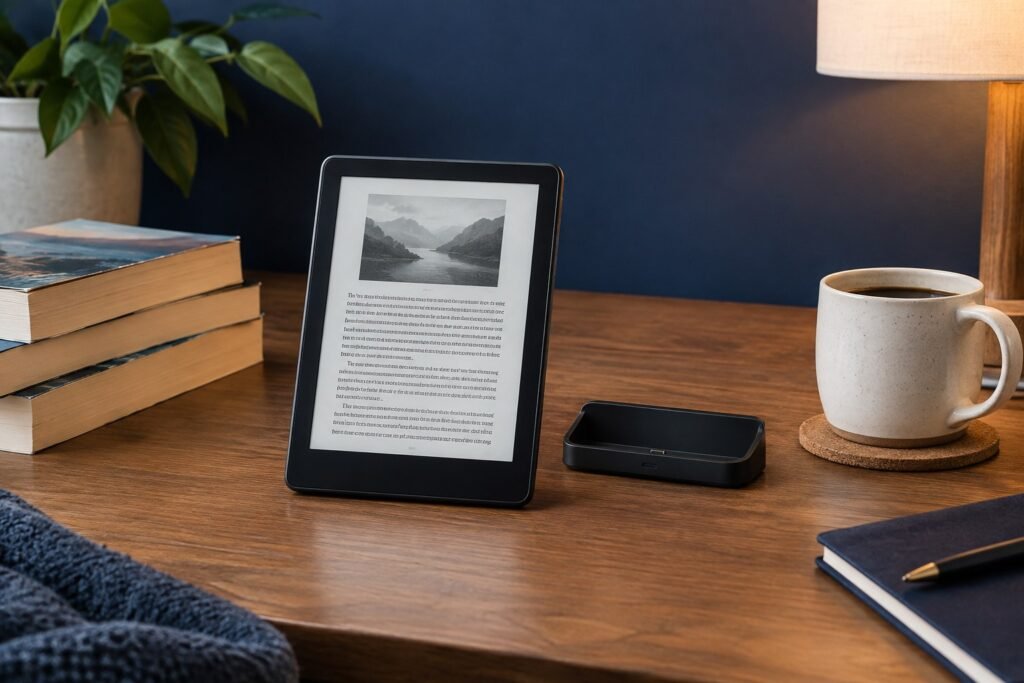
Short verdict: The Kindle Paperwhite Signature Edition is the premium version of Amazon’s black-and-white Paperwhite e-reader. It is most compelling for readers who value the higher storage capacity and its generation-specific charging convenience. But if you mostly read ordinary ebooks and do not need those extras, the standard Paperwhite offers much of the same reading experience. Check the release year before buying: the 2026 and 2024 Signature Edition models do not describe their charging systems in the same way.
This research-based review compares Amazon’s documented features and likely use cases. ThinkQuarry has not performed a hands-on benchmark, battery rundown, display measurement or independent durability test on these units. Prices and retailer bundles vary by location and date.
How This Review Was Researched: Google Search, Independent Tests and Real Customer Feedback
Editorial methodology (updated November 12, 2026): We checked Amazon’s official model-identification specifications against Tom’s Guide’s 2026 hands-on review, Engadget’s 2026 review, WIRED’s 2026 comparison, and TechRadar’s hands-on review of the 2024 model. We also consulted Best Buy’s customer-review page for the 2024 Signature Edition. These Google Search-accessible sources are independent publications or retailer-hosted customer feedback, not ThinkQuarry’s own testing and not ratings from Google Maps. We distinguish editor testing, retailer customer opinions, and manufacturer claims instead of blending them into an invented average score.
What Did Independent Reviewers Actually Find in the 2026 Kindle Signature Edition?
- Tom’s Guide (Tony Polanco; October 28, 2026): After two weeks with the 2026 device, Polanco reported appreciation for the aluminum rear, moved power button, text clarity and long battery endurance, while flagging the higher price and proprietary charging accessory. Those observations are his test results, not our own.
- Engadget (Billy Steele; October 28, 2026): Its published review gave the 2026 device 8.6/10. It highlighted the high-contrast text, speed, automatic lighting and more premium body, but questioned the price and accessory change. That numeric score belongs to Engadget alone.
- WIRED (Nena Farrell; October 28, 2026): Its review noted the aluminum-backed Signature construction, new accessory connectors and higher price, while questioning whether existing Kindle owners need to upgrade. WIRED’s evaluation is separate from those of Tom’s Guide and Engadget.
- TechRadar (Philip Berne; November 27, 2024): In testing the 2024 edition, Berne praised the faster, smoother navigation but regarded the premium upgrade as unnecessary for many buyers. This review is historical context and should not be passed off as a 2026 field test.
What Do Verified Customer Reviews Say? Important Generation Caveat
Best Buy’s 2024 Kindle Paperwhite Signature Edition customer-review page shows a high aggregate rating (about 4.9/5 across hundreds of reviews in the indexed listing). Recurring customer-review topics on that specific 2024 listing include ease of use, portability, screen quality and battery life. Review counts and ratings are dynamic; the source page may change after our research date. Some retailer review summaries are automatically generated, so they should be read as topic indicators rather than independent lab evidence. These ratings do not describe the 2026 model. We did not locate a comparably established 2026 customer-review sample suitable for assigning it a verified aggregate score.
Evidence-based conclusion: The 2026 professional reviewers broadly agree the hardware refinements are real, but disagree about how compelling the extra price is. A shopper should compare the exact generation, current selling price, and accessory requirements rather than rely on a rating carried over from an older model.
What Is the Kindle Paperwhite Signature Edition?
The Signature Edition is a more fully equipped version of the Kindle Paperwhite, intended for long-form reading on an E Ink screen. It is different from the color-screen Kindle Colorsoft and from a tablet. The screen is designed primarily for comfortable text reading, not video, fast color illustrations, or general-purpose apps.
The important purchasing question is not simply ‘Is the Signature Edition good?’ but ‘Which Signature Edition generation am I looking at, and what do its extras add for me?’ Amazon has released Signature Edition variants associated with the 11th-generation Paperwhite (2021), 12th-generation Paperwhite (2024), and a separately listed 2026 release.
Kindle Paperwhite Signature Edition 2026: Key Confirmed Specs
Amazon’s official Kindle identification page lists the following features for the 2026 Signature Edition:
- Display: 7-inch, glare-free E Ink, 300 pixels per inch.
- Storage: 32 GB internal, with roughly 25 GB available to the user.
- Charging: USB-C plus pogo-pin connector charging with a separately sold dock.
- Lighting: adjustable warm front light.
- Battery: claimed up to 12 weeks, subject to usage conditions.
- Water resistance: IPX8-rated waterproofing.
- Other: Dark Mode, Bluetooth VoiceView screen reader, and an EBR-compliant user-replaceable battery.
Buyer warning: Do not automatically carry over the marketing copy of older editions. In particular, Amazon’s 2026 identification entry specifies a pogo-pin dock connector, while its 2024 and 2021 Signature Edition entries explicitly list wireless charging. Confirm the actual product SKU and compatible dock before paying for a charging accessory.
Kindle Paperwhite vs Signature Edition (2026)
| Feature | Paperwhite 2026 | Signature Edition 2026 |
|---|---|---|
| Screen | 7-inch, 300 ppi E Ink | 7-inch, 300 ppi E Ink |
| Internal storage | 16 GB | 32 GB |
| Available storage (approx.) | 11.5 GB | 25 GB |
| Warm front light | Yes, adjustable | Yes, auto-adjusting |
| Waterproof rating | IPX8 | IPX8 |
| Claimed battery life | Up to 12 weeks | Up to 12 weeks |
| Charging documented by Amazon | USB-C | USB-C and pogo-pin dock connector |
The core screen resolution and headline battery claim are the same in these official listings. The Signature Edition therefore looks like a convenience and capacity upgrade, not a fundamentally different reading platform. For the 2026 Signature model, Tom’s Guide, Engadget and WIRED specifically report an auto-adjusting ambient front light; Amazon’s brief identification table does not enumerate every premium feature. This distinction is therefore grounded in independent hands-on reviews, rather than inferred from the model name.
Kindle Paperwhite Signature Edition 12th Generation (2024) vs 2026
The 2024 12th-generation Kindle Paperwhite Signature Edition 32GB is still likely to appear in comparisons, reviews, accessory listings and secondhand sales. Amazon documents its 7-inch 300 ppi reading experience, warm front light, USB-C, wireless charging with a separately sold dock, IPX8 waterproofing, and up to 12 weeks of battery life.
The newer 2026 listing likewise has a 7-inch 300 ppi screen, 32 GB storage, warm front light, and IPX8 rating, but it describes pogo-pin connector dock charging and a user-replaceable battery. These differences matter when selecting a charging dock or an older case.
For shoppers searching Kindle Paperwhite Signature Edition 12th generation, always cross-check the store’s release year and model number. The words “Signature Edition” alone do not guarantee accessory compatibility.
Kindle Paperwhite Signature Edition 11th Generation (2021)
Amazon’s product identification page lists the older 11th-generation Signature Edition with a USB-C port, Qi wireless charging support with a compatible dock, an auto-adjusting front light, Dark Mode, and 32 GB total storage (approximately 27 GB available in its listing). Used-market buyers may find it at a lower price, but its older generation, condition, battery health and available updates should factor into the decision.
The 2021 features should not be quoted as if they automatically apply to the 2026 edition. Reading an accessory listing that says “11th generation” is not sufficient evidence that it fits the 12th generation or the newer release.
Is the Kindle Paperwhite Signature Edition 32GB Worth It?
For text-only ebook readers, 16 GB can already hold a large personal library, depending on book length and file type. The jump to 32 GB matters more if you keep large image-heavy PDFs, comics, graphic novels, magazines or audiobooks on the device. Available space is always less than the advertised total because system software uses some storage.
Still, higher capacity does not improve a book’s typography or speed by itself. If the price premium over a standard Paperwhite is significant, ask whether you will truly use the extra storage and dock-charging convenience. A protective case or a larger ebook budget may be a more practical use of the difference for some readers.
How Good Is the Display and Reading Experience?
Both current Paperwhite editions listed by Amazon have a 7-inch glare-free 300 ppi E Ink display and an adjustable warm front light. This combination is intended for sharp text and adaptable lighting during outdoor or nighttime reading. E Ink behaves differently from a phone display: page transitions can feel slower than animations on a tablet, and it is not suited to video.
Because the 2026 standard Paperwhite and Signature Edition share these headline screen specifications, shoppers should not expect the Signature Edition simply to transform the legibility of standard ebooks. The strongest reason to upgrade is more likely the extra convenience features, not a radically sharper display.
Charging: Wireless Charging, USB-C and the 2026 Dock
Terminology note: Reviewers use the words wireless charging for the 2026 model’s accessory-dock experience, while Amazon’s hardware identification guide specifically lists a pogo-pin connector. These descriptions are not necessarily contradictory: the newer charging dock can avoid manually plugging a USB-C cable into the reader while still using proprietary rear contacts. It must not be confused with open compatibility with older Qi charging pads. For context, Engadget’s review explicitly discusses the move from the prior charging arrangement to a new accessory system, and WIRED’s review describes the new rear pogo pins.
“Kindle Paperwhite Signature Edition wireless charging” is a common search query, but it needs a generation-specific answer:
- 2021 Signature Edition: Amazon lists wireless charging and USB-C.
- 2024 12th-generation Signature Edition: Amazon lists wireless charging and USB-C.
- 2026 Signature Edition: Amazon’s identification guide lists USB-C and pogo-pin connector charging with a separately sold dock.
Do not buy a Qi wireless dock for a 2026 unit solely because an older review recommended it. Amazon maintains separate support instructions for compatible wireless-charging Kindle devices, but model details still take precedence. If a seller calls the 2026 device “wireless charging,” verify the exact charging standard and dock compatibility rather than assuming Qi support.
Kindle Colorsoft vs Paperwhite: Which Reader Makes Sense?
The Kindle Colorsoft family has a color E Ink screen, making it more attractive for book covers, highlighted text and illustrated content. The Paperwhite Signature Edition prioritizes black-and-white reading and its model-specific premium conveniences. Color is not automatically the better choice for novels: buyers should weigh image requirements, screen preferences, model generation and price.
If a buyer routinely reads illustrated books or color-coded documents, compare a Colorsoft directly. If they mostly read novels or nonfiction in black-and-white, start by comparing the standard Paperwhite and Signature Edition instead of paying for color they rarely need.
Kindle Paperwhite vs Basic Kindle
The Basic Kindle line generally targets readers who want a compact, simpler entry point. The Paperwhite line emphasizes a larger, waterproof reading experience with warm lighting in recent models. The right comparison depends on each exact model year: do not compare a 2026 Paperwhite against an unspecified older Basic Kindle and treat every difference as permanent across generations.
Kindle Paperwhite Signature Edition Case and Accessories
A case should match your exact Kindle model and generation, not merely the words “Paperwhite Signature Edition.” Check screen size, button and port locations, body dimensions, and whether a case interferes with the charging dock. If you plan to use a 2026 pogo-pin dock, confirm compatibility with the case on the product listing. Likewise, older Qi charging stands should be matched to the appropriate generation.
Who Should Buy or Skip the Signature Edition?
| Reader type | More sensible choice | Why |
|---|---|---|
| Mostly reads plain-text ebooks | Standard Paperwhite | Same listed 2026 screen resolution and battery claim |
| Stores many big files or audiobooks | Signature Edition | 32 GB storage offers more room |
| Values convenient dock charging | Signature Edition, correct generation | Check 2026 pogo-pin vs older wireless docking |
| Needs color illustrations | Compare Colorsoft | Color E Ink may suit visual content better |
| Has a functioning older Paperwhite | Consider keeping it | A replacement is not automatically necessary |
Evidence Snapshot: What the Sources Actually Establish
| Evidence | Source | Interpretation |
|---|---|---|
| 2026 model 8.6/10 | Engadget review | One publication’s editorial score, not an average customer rating |
| 2026 improved housing and power button | Tom’s Guide, two-week test | Reviewer’s hands-on observation |
| 2024 model 4.9/5 across hundreds of reviews | Best Buy customer reviews | Older generation, retailer-specific dynamic rating |
| 32GB, pogo-pin charging, 7-inch 300ppi display | Amazon official specifications | Manufacturer specifications, not measured by ThinkQuarry |
Pros and Cons
Strengths
- 7-inch, 300 ppi glare-free E Ink display for focused reading.
- 32 GB internal storage with about 25 GB available in the 2026 listing.
- Adjustable warm light, IPX8 waterproofing and long claimed battery life.
- Extra charging convenience compared with the standard 2026 Paperwhite, provided the right dock is used.
Limitations
- Premium pricing may not justify the extra capacity for light ebook readers.
- Most headline reading specifications overlap with the standard 2026 Paperwhite.
- Accessory and charging compatibility vary across the 2021, 2024 and 2026 models.
- Black-and-white E Ink is not the right fit for everyone who reads color-heavy material.
Frequently Asked Questions
1. What is special about the Kindle Paperwhite Signature Edition?
Its biggest documented 2026 differences from the standard Paperwhite are 32 GB instead of 16 GB and support for a pogo-pin charging dock. Confirm additional seller-specific claims against the exact model.
2. Does the Kindle Paperwhite Signature Edition have wireless charging?
Amazon lists wireless charging for the 2021 and 2024 Signature Editions, but the 2026 model entry specifies pogo-pin dock charging and USB-C. Check your model before buying a dock.
3. Is the Kindle Paperwhite Signature Edition 32GB necessary for novels?
Usually not for ordinary text-only books; 16 GB is ample for many readers. The 32 GB model is more useful for larger files, audiobooks and very large offline libraries.
4. What is the difference between Paperwhite and Signature Edition?
In Amazon’s 2026 listings, both have a 7-inch 300 ppi display, warm light, IPX8 waterproofing and up to 12 weeks claimed battery life. Signature doubles internal storage and adds pogo-pin dock charging.
5. Is the 2024 Signature Edition the 12th generation?
Yes. Amazon identifies the 2024 release as the Kindle Paperwhite Signature Edition (12th Generation). The 2026 release is listed separately.
6. Will an 11th-generation case fit a 2026 Signature Edition?
Do not assume so. Verify dimensions, release year, port and button cutouts, and dock compatibility with the accessory maker.
7. Is Kindle Colorsoft better than the Paperwhite Signature Edition?
It serves a different need. Colorsoft focuses on color E Ink; Paperwhite Signature is an option for readers who prefer monochrome reading with higher storage and generation-specific charging conveniences.
Final Verdict: Is It Worth the Upgrade? (Based on Published Reviews)
Buy the Signature Edition if you want its additional storage or dock-charging support and have checked the exact release year. Choose the standard Paperwhite if your priority is reading text comfortably at the lowest sensible price within the same generation. Keep your existing Kindle if it already meets your needs and the upgrade is mainly cosmetic.
This is a specification-led evaluation, not an independent lab score. Amazon’s price, availability, packaging and accessories may change, so verify them before purchasing.
Sources, Disclosure and Last Review
Checked November 12, 2026 using Amazon: Identify Your Kindle E-Reader, Amazon: Kindle E-Reader User Guides, and Amazon: Kindle Wireless Charging Troubleshooting. No complimentary unit or hands-on testing is claimed. Product names and trademarks belong to their respective owners.